Radius and polygon areas
The two shapes every plan can draw, a circle of any size around a point and an outline traced corner by corner, with every control explained and advice on which to use when.
What this is for
A radius area is a circle. A polygon area is any outline you trace. Between them they cover most questions, and they are the two kinds of area every plan can draw, so they are where most people start.
A circle is the right shape for a quick, even look around a point, before the shape of the market is known. "Who lives within a mile of this corner" is a circle. It is also the shape most of the industry's rules of thumb are written for, so a one mile or three mile circle is easy to compare with figures from elsewhere.
A polygon is the right shape when the market has a shape of its own that a circle would get wrong. A shopping street is long and thin. A neighborhood may be cut off on one side by a freeway or a river that nobody crosses to shop. A leasing agent may want exactly the blocks a landlord owns. In each case tracing the outline gives a truer figure than a circle that takes in half a park or a quarter of the wrong neighborhood.
Both shapes are measured the same way, by finding the census block groups the shape touches and apportioning each one's people by how much of it falls inside the line, which What MarketGround measures explains.
Where to find it
Both are in the toolbar above the map, as the first two of the six shape buttons, Radius and Polygon. Radius is selected when you sign in. Both are included in every plan.
Drawing a circle
- Make sure Radius is selected in the toolbar. It is dark when it is.
- Click the map where you want the center. A circle appears at once, one mile in radius, and the panel on the right fills with its figures.
- To draw a circle of a different size by hand instead, press the mouse button at the center and drag outward. The circle grows as you drag and settles when you let go.
- To move the circle, drag it by its middle. To move only the center pin, drag the pin.
- To change the size after drawing, change the number in the Radius box or choose another unit. The circle redraws and the panel updates.
A search in the box above the map does the first two steps for you. Choosing a result centers the map on it and draws the circle there.

The radius controls, one at a time
The Radius box holds the distance from the center to the edge. It starts at 1. Type any number, including decimals such as 0.5 or 2.5. The circle redraws when you leave the box or press Enter.
The unit menu beside it offers mi for miles, km for kilometers and m for meters. Miles is the default because it is what the industry in the United States uses. Changing the unit keeps the number, so 1 mile becomes 1 kilometer, which is a smaller circle, rather than converting.
The default of one mile is where most retail work begins. In a dense city a one mile radius already holds tens of thousands of people, so for a single neighborhood or a walk-up business you will often want half a mile or a quarter. In a suburb or a small town, three miles is nearer to a real trade area, and a destination store may draw from ten. There is no upper limit on a circle apart from the analysis ceiling, which is far larger than any trade area.
Drawing a polygon
- Select Polygon in the toolbar.
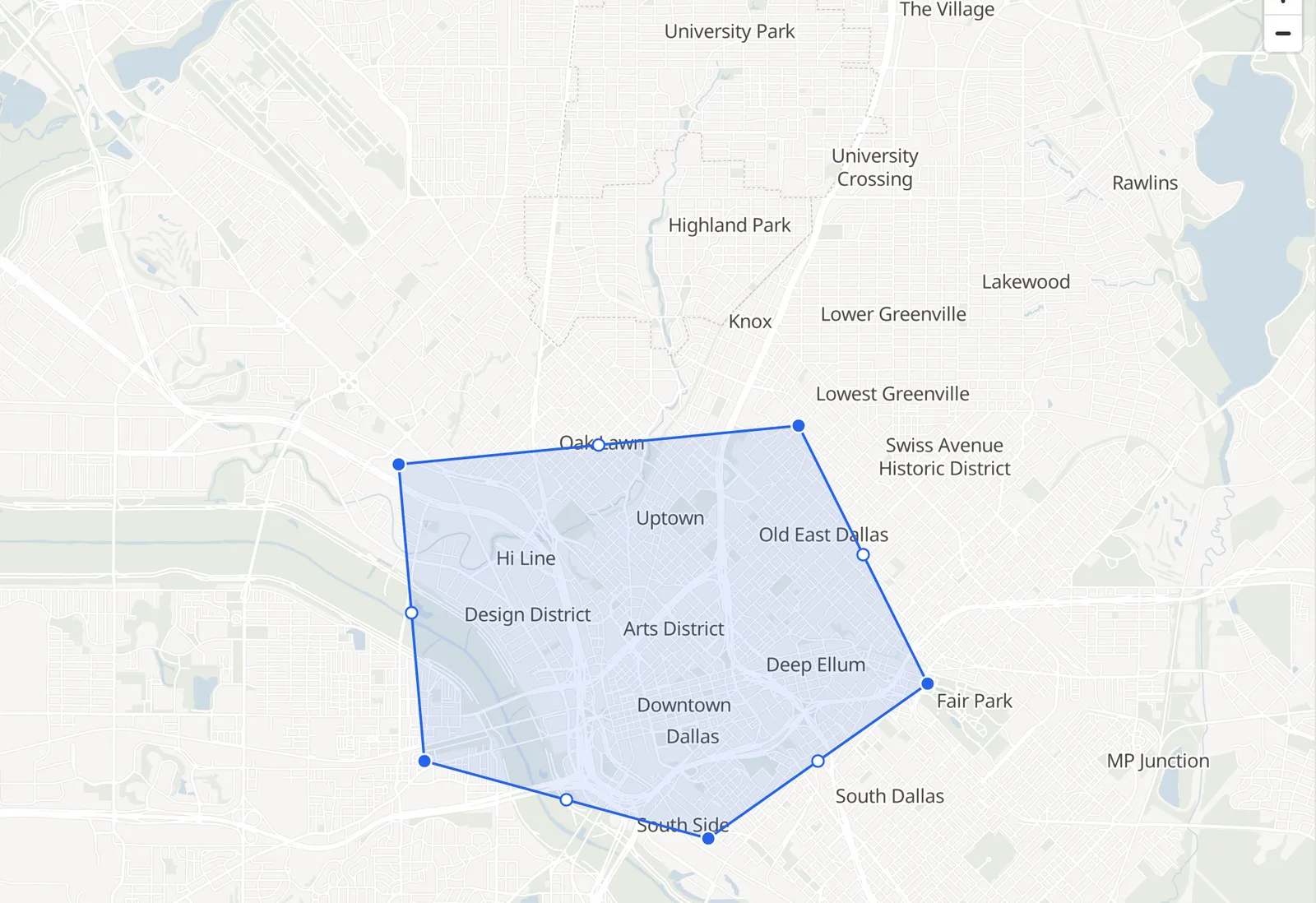
- Click the map at each corner of the outline in turn. A line follows you from the last corner, so you can see the edge before you place it.
- While you are drawing, dragging with the right mouse button moves the map, so you can trace an outline bigger than the screen.
- Double-click to place the last corner and close the shape. The panel fills with its figures.
- To adjust the shape after it is closed, press Edit corners on the map. Each corner becomes a handle you can drag, and a hollow dot on each edge adds a corner where you drag it. Press Done when the outline is right. Dragging the middle of the shape moves all of it.
Tips for tracing
Trace generously around the blocks you mean to include. The figures are apportioned by how much of each census block group falls inside the line, so an edge that runs down the middle of a street takes half of the homes on that street, which is usually what you want, while an edge that cuts through the middle of a block takes a share of that block's people by how much of it is inside, which may not be.
Fewer corners are better than more. A shape with six or eight corners is easy to adjust and reads clearly on the map and in a report. A polygon may have up to 2,500 corners, which is what a city drive time can carry, but a hand-drawn shape rarely needs more than twenty.
A polygon can have only one part. To analyze two separate districts, save each as its own area in the same project, and the panel's Whole project line gives their combined figures with any overlap counted once.
Reading the results
The panel shows the same figures for either shape. The first four tiles are Population, Households, Median income and Median age, with Day / night beneath them, which The side panel explains. The small text under the population figure gives the shape's area in square kilometers, how many block groups it touches and the survey year the figures come from.
The number of block groups is worth a glance. A shape that touches only one or two is being measured from very few survey responses, and its figures will carry wide margins, which show on paid plans as the range under each figure. A shape that touches twenty or more is on firm ground.
An example
On 30 October 2026 a circle of one mile radius centered on Klyde Warren Park in Dallas touched 31 block groups over 8.1 square kilometers and read 34,714 people in 23,636 households, with a median household income of $108,908 and a median age of 31.1. A polygon traced around the Arts District alone, about eight blocks, reads a small fraction of that, because the Arts District is museums and offices with few homes, which is exactly the kind of difference a traced outline reveals and a circle hides.
Things to know
A circle's figures depend on the center as much as the size. Moving a one mile circle by a few hundred meters in a dense city can change its population by thousands, so place the center where the business actually is, not on the nearest landmark.
Dragging a corner of a saved polygon does not change the saved area until you save the new shape over it. Editing a saved area explains how.
A shape that extends over water or open land counts the people who live there, which is none, so a circle on a lakefront reads lower than the same circle inland. That is correct, not an error.
The free plan saves up to four areas in one project. Drawing is not limited, only saving.
Related pages
Travel time areas are the shape to use when distance by road matters more than distance as the crow flies. Rings and bands draw several circles at once. Named boundaries use a ZIP code or a county as the area. The map describes the toolbar, and Editing a saved area describes changing a shape you have saved.