Travel time areas
The area you can reach from a point in a set number of minutes by car, on foot, by bicycle or by public transit, following the real roads and timetables, with the mode, the minutes, the traffic switch and the departure time explained.
What this is for
A circle treats every direction the same. Real customers do not. They come along roads, and a store beside a highway exit draws from ten miles down the highway and from three blocks on the other side of the railway. A travel time area, which the trade calls an isochrone, draws the area that can actually reach a point within a number of minutes, following the roads, the footpaths or the transit timetables, so its edge is ragged where the network is and its shape is the shape of the catchment.
Use a travel time area whenever the question is "who can get here", which is most site questions. A ten minute drive is the usual starting point for a neighborhood store, a fifteen minute walk for a cafe or a gym in a dense city, and a thirty minute transit trip for an employer deciding where staff can reach.
Where to find it
Travel time is the third shape button in the toolbar above the map. It is part of the Pro and Team plans, with areas up to 60 minutes, beyond which an area stops being a trade area and starts being a region. On the free plan the button shows a note and a link to the plans.
Step by step
- Select Travel time in the toolbar. The travel controls appear beside it.
- Choose the mode, Drive, Walk, Bike or Transit.
- Choose the minutes from the row of buttons, 5, 10, 15, 30, 45 or 60. The default is 10.
- Click the map at the starting point. After a moment the area appears, and the panel fills with its figures. A search in the box above the map does the same for a named place.
- To try another setting, change it. The area is drawn again from the same point.
The settings, one at a time
Mode. Drive follows the road network with posted or inferred speeds, turn restrictions and one-way streets, under free-flowing conditions unless the traffic switch is on. Walk follows footpaths and streets at 4.5 kilometers per hour, about 2.8 miles per hour, which is a steady adult walking pace. Bike follows roads and cycle paths at a cycling pace. Transit follows the published timetables of the transit agencies, with the walk to the stop, the scheduled wait and the walk from the stop all counted, at the same walking pace.
Minutes. The six choices are the ones the industry uses. Five and ten minutes describe a neighborhood, fifteen and thirty a district or a city, and forty-five and sixty the reach of a destination. The default of ten minutes is the usual drive to a neighborhood store. A transit area of five minutes is barely larger than the walk to the stop, because most of a short transit trip is waiting, so for transit start at thirty.
Traffic. For driving, a switch marked Traffic uses typical traffic conditions for a chosen day of the week and time of day instead of free-flowing roads, so that a ten minute drive at 5 pm on a Friday is smaller than one at 10 am on a Sunday. When the switch is on, a day and time control appears beside it. Typical traffic comes from a routing provider's traffic model and the result says so. Each organization has an allowance of traffic areas a month, shown on the usage page in settings.
Departure day and time. For transit, the day and time control is always shown, because a transit area depends entirely on when the timetable runs. The area for 8 am on a Tuesday and for 11 pm on a Sunday are different places. The control offers the days of the week and a time of day, and the product uses the soonest such moment, within the period the loaded timetables cover. The time is read as local time where the pin is, not where you are sitting.

Reading the results
The panel shows the same figures as for any shape. The note under the population figure gives the area in square kilometers and the block groups touched, and the saved area's line in the Areas section describes the setting, such as 10 min drive.
Two notes can appear with a travel time area and are worth reading. If the starting point is not on a road, for example in the middle of a large parking lot or a park, the product moves it to the nearest road before routing and says how far it moved. A pin placed well off the network can snap to an unexpected road, so check that the area starts where you meant. If a transit timetable is not loaded near the point, the product says so rather than quietly drawing a walking area.
Travel time areas often touch more block groups than a circle of the same area, because they reach further along the roads, and so their figures can carry slightly narrower margins. A ten minute drive from downtown Dallas covers about 206 square kilometers and touches about 380 block groups, where a circle of the same area touches about 340.
An example
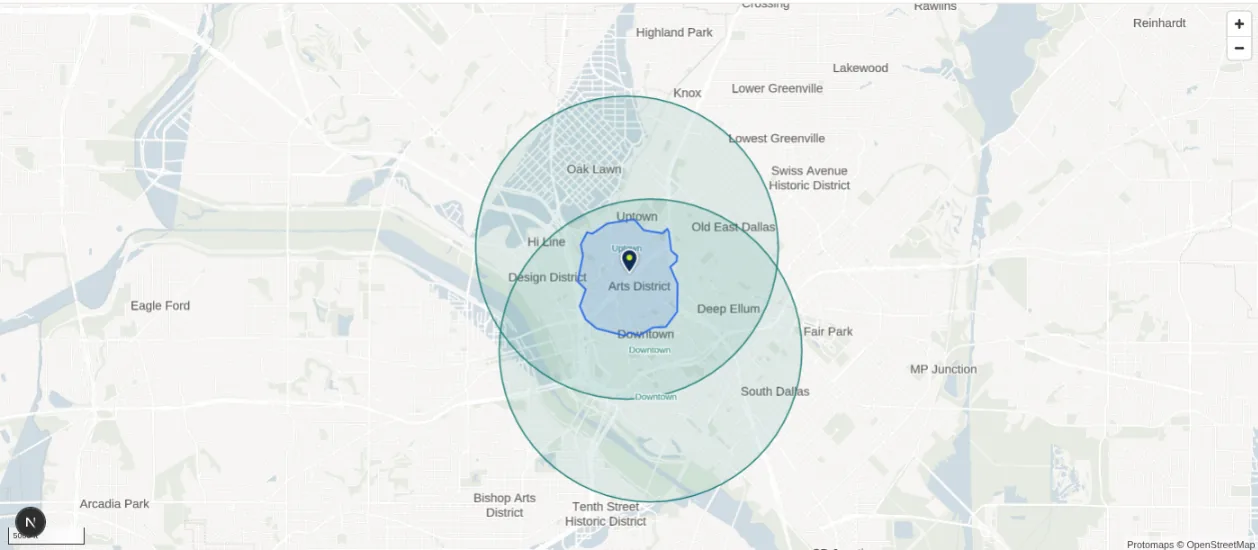
The product's own regression figures include a ten minute drive from downtown Dallas, which returns in about a second with an outline of about 1,200 corners and covers 206 square kilometers, less than the 249 of a circle of equal reach because the roads do not run evenly in every direction. A fifteen minute walk from Klyde Warren Park covers the Arts District, Uptown and the north edge of downtown, as the picture above shows, and reads a population of about 13,000, which is the figure the Getting started page quotes for it.
Things to know
Timetables are loaded for agencies in thirty-three of the forty largest metros, and inside a metro only for the agencies that publish in a form the product can load. The methodology page lists the metros and the gaps, such as Muni in San Francisco and the Manhattan, Brooklyn and Bronx buses in New York. Where no timetable is loaded, a transit area says so.
A travel time area is drawn from the roads as they are in OpenStreetMap and from timetables as published. A new road or a route change reaches the product with the next update of each.
An area of 45 or 60 minutes by car can cover a whole metro and takes longer to draw and to analyze. Start smaller and widen if the question needs it.
A saved travel time area keeps the shape that was drawn. If the roads or the timetable change later, the saved shape does not redraw itself. Open it for editing and save it again to redraw it, which Editing a saved area explains.
Related pages
Radius and polygon areas are the simpler shapes. Rings and bands can be drawn in minutes as well as miles. The map describes the toolbar, and the methodology page says which roads and timetables are used and how.