Retail trade area analysis and site selection software
Understand the market around your next location
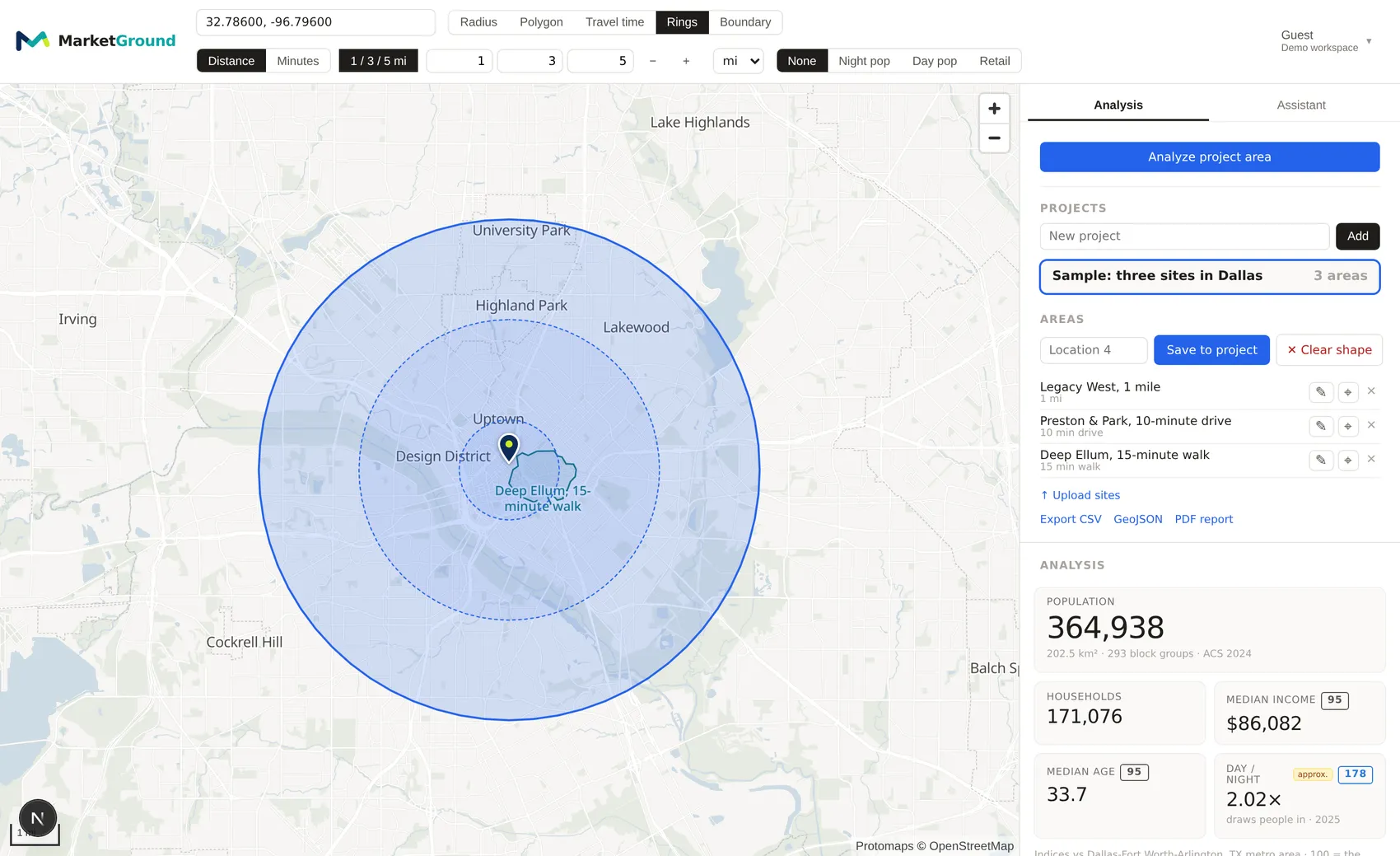
MarketGround helps you evaluate locations across the United States. Draw an area on the map to explore its population, household income and nearby businesses. Use a radius, a travel time or your own boundary to see the market around a site.
Population, demographics and business listings cover every state and the District of Columbia.
Why people use it
Explore the people and businesses around a site
See who is within reach
Estimate how many people live within a chosen driving, walking, cycling or transit time. Travel areas follow the road and transit networks to help you compare access around potential locations.
Explore who lives there
Explore income, age, household size, housing, education and commuting patterns. MarketGround uses Census Bureau data to estimate 250 demographic measures for your selected area. Combined tables let you examine characteristics together, such as age and sex, with margins of error shown alongside the estimates.
Review nearby businesses
See businesses listed within your area, grouped by category and brand. The results help you identify potential competitors and nearby businesses that may attract similar customers. Listings come from Overture Maps.
Day and night
Compare resident and daytime populations
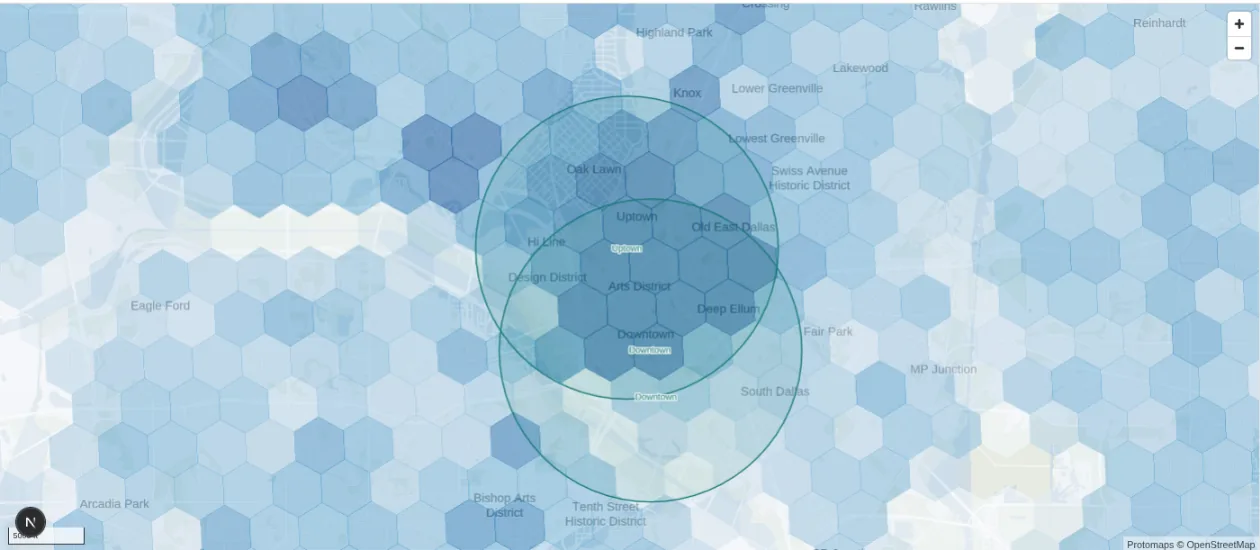
An area can have a much larger population during the working day than its resident count suggests. MarketGround provides both measures. The Dallas map shows higher daytime estimates around downtown and the Arts District, adding context for locations that depend on daytime activity.
Benchmarks
Compare your area with the surrounding market
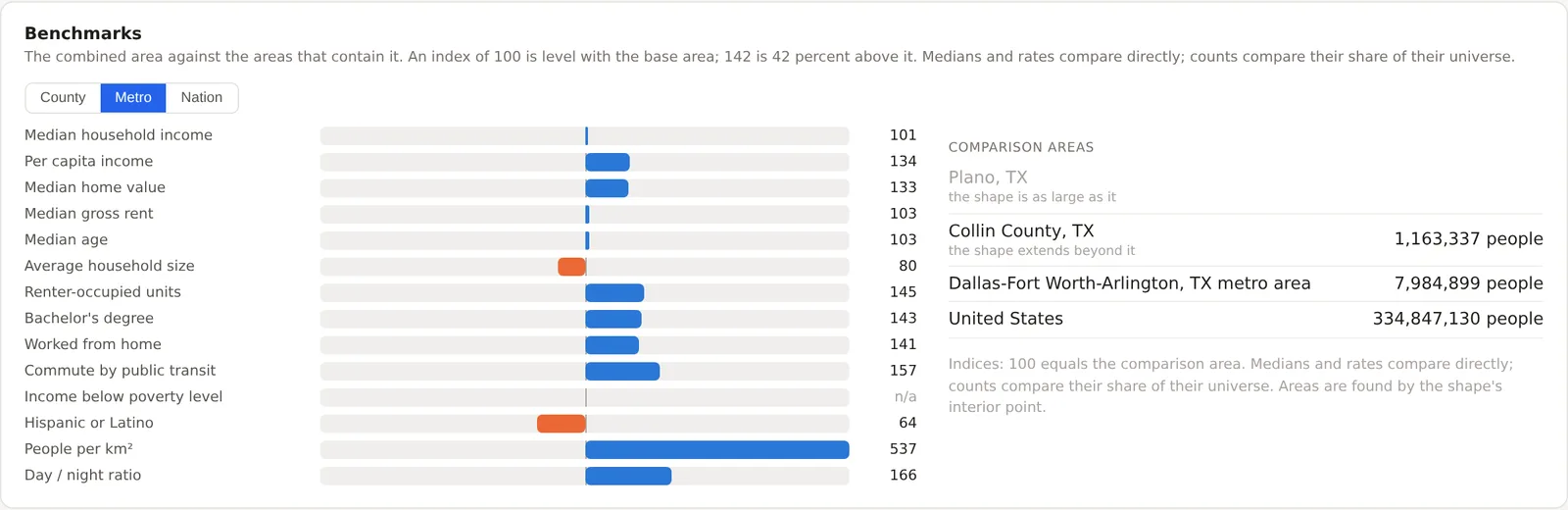
Benchmarks show how your selected area compares with its city, county, metro area and the nation. An index of 100 matches the comparison area. An income index of 101 is 1 percent higher, while a renter index of 145 means the share of rented homes is 45 percent higher. Counts with a defined comparison population are converted to shares before indexing.
Projects
Save and compare locations in one project
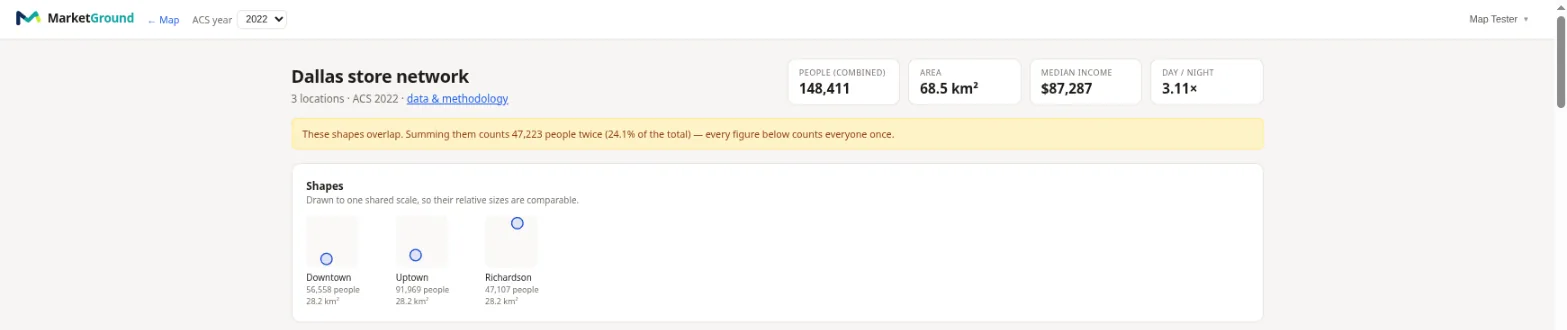
A project report brings your saved areas together and compares them side by side. Combined estimates account for overlapping areas so the shared population is included once. The report also shows how much the areas overlap. Send it to a client as a read-only link carrying your own logo, with an expiry date and, if you want one, a passcode.
See the full report on the features pageTraffic and business change
See what passes the site and what is opening near it
Alongside who lives in an area, MarketGround reports the traffic on the roads that border it and the businesses that have appeared or dropped out of the listings nearby. Counts come from state departments of transportation and are spread across the hours of a week by the pattern of the Federal Highway Administration's continuous counters, so a weekday peak and a quiet Sunday are visible rather than assumed. Transit access sits alongside, with the stops inside the area by mode and the share of residents living within 400 meters of any stop and of a frequent one.
Traffic, transit and businesses on the features page- Counted roads bordering the area, with vehicles a day and the year of the count
- 168 hours of traffic for each road, beside a modeled pattern for the area itself
- Transit stops by mode, and the share of residents within a five-minute walk of one
- Opened and no longer listed over three, six or twelve months, broken down by type
- The metro alongside, so local change reads against the wider market
Competition and co-tenancy
Count the competition and read who usually sits beside you
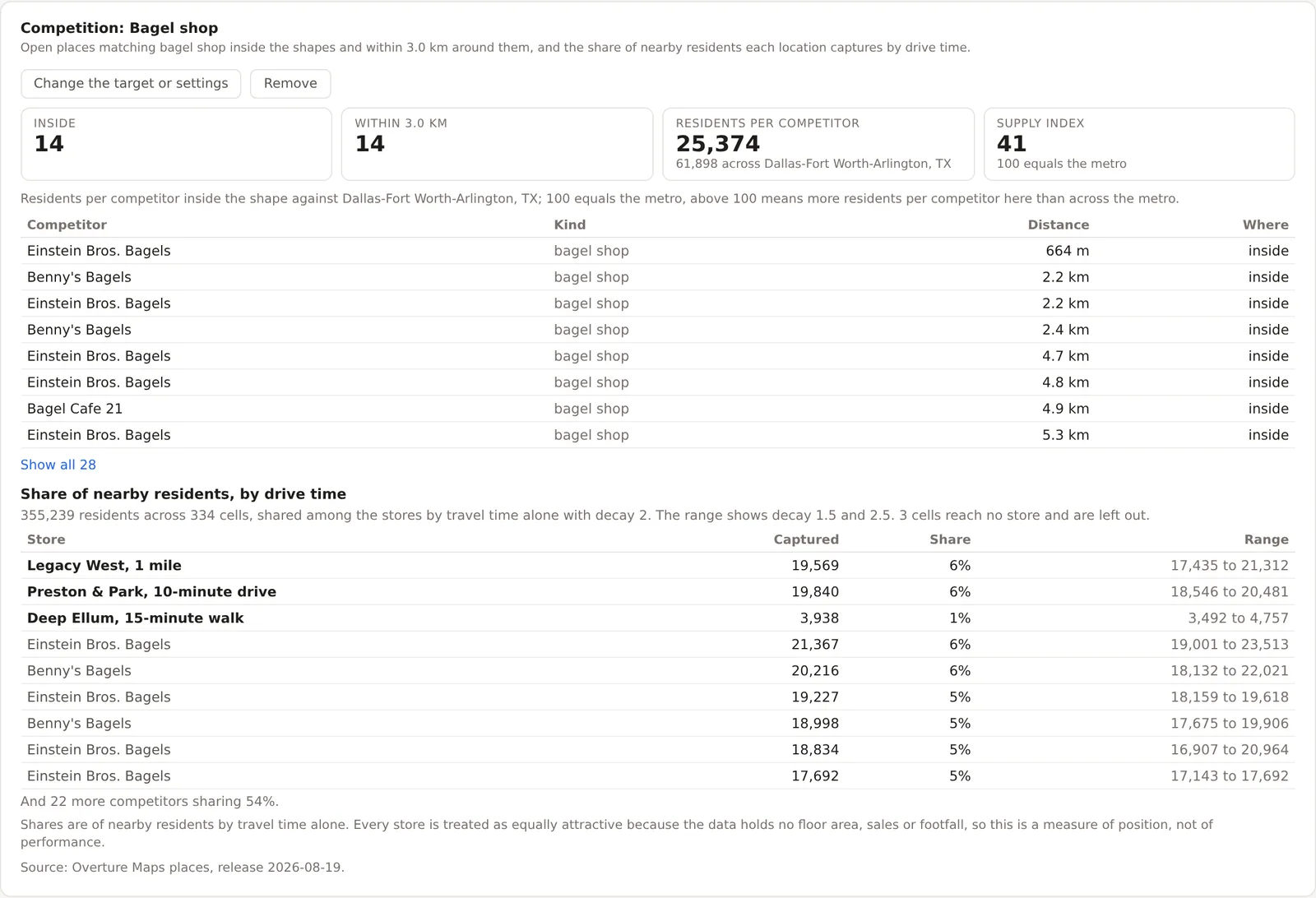
Choose the kind of business you compete with and MarketGround counts the open places inside the area and around it, indexes the residents per competitor against the metro, and estimates each store's share of nearby residents by travel time alone, with the assumptions printed beside the number. A co-tenancy profile then says how many of the neighbors a brand usually has within a five-minute walk are already present around a site, or which brands fit a vacancy, with the neighbors present and missing one click away. Both are included on Pro and Team.
Competition on the features pageFrom analysis to a decision
Judge the sites, forecast them and record the choice
Screen every site
Enter the thresholds from a client's criteria sheet, such as population within three miles above 50,000 or at most two competitors within two miles, and every saved site is judged line by line with the figure beside the result. Starter templates cover coffee, quick service, urgent care, fitness, childcare, pet and salons.
Test whether the order holds
Two sites can swap places between a one-mile ring and a five-mile ring, or between a radius and a drive time. The stress test ranks them under each scenario you choose and explains where the ranking changes and which measure moved it, rather than reducing everything to one score.
Forecast from your own stores
Upload the stores you already run with their sales beside each address, and a model fitted to your own figures scores any candidate corner in your own currency, with a likely range, the drivers behind it, and the error it made on stores it had never seen. The answer a site consultant charges a retainer for, in minutes.
Record what you chose
Save which site was chosen, against which criteria and for what reason, and add the outcome when you know it. The record keeps the candidates and the criteria as they were worded on the day, and the history stays searchable across every project.
The criteria screener, the stress test, the sales forecast and the decision history are included on Pro and Team. See how each one works.
The assistant
Ask questions about an area or project
Ask how many people live near a location, compare daytime populations or find the saved area with the highest median household income. The assistant uses the same analysis tools as the map and explains the results in plain language. Every plan includes assistant access. Team also includes a deep analysis mode for more detailed questions.
- Finds the place from a city, county, landmark, business or street address
- Draws the area as a radius or a drive, walk, bike or transit time
- Reads your projects and compares saved locations side by side
- Says what it does not know rather than filling the gap
Sources and methods
Every figure has a documented source
MarketGround combines Census population and demographic data with employment statistics, federal traffic counts and Overture Maps business listings. Results are calculated for your selected area using a fine geographic grid. Explore population history and business listings refreshed monthly.
The methodology page explains the sources, calculations and validation checks- 0.12 km² grid cells under every area, about 340 m across
- Back to 2016 population history, night and day
- 250 demographic measures, including age by sex and four other combined Census tables
- 16 million listed businesses and places nationwide, refreshed monthly
- 2.76 million miles of counted road, spread over the 168 hours of a week
What people use it for
Explore common uses
See how MarketGround can help with trade area analysis, site selection and other location decisions. The examples use results from the product. Research articles include sources and location details so readers can review the analysis.
Define an area and explore its population, income and listed businesses.
Compare candidate stores using nearby households, daytime population and listed businesses.
Compare proposed franchise territories using consistent areas and a report you can share.
Compare residents, daytime population and restaurants around potential locations.
Add population, employment, income and travel access information to property analysis.
Compare estimated daytime population with residents for the area you choose.
Plans
Choose a plan for your work
Free
The Free plan includes one project with up to four saved areas. Draw a radius or custom boundary and explore core demographics, including population, households, income, age and housing, along with resident and daytime population.
Create a free accountPro
Pro is for individuals who regularly evaluate locations. It includes unlimited projects and manually drawn saved areas, travel areas of up to 60 minutes, distance and travel time rings, and analysis of named geographic boundaries.
Upgrade to ProTeam
Team includes Pro features with shared projects, deep analysis and 300 assistant questions per seat each month.
Set up a TeamCompare features and usage limits on the pricing page.
Explore a location you know
Create a free account and draw an area around a familiar location. Review the results to see what they add to your understanding of the market.
Create a free account