Named boundaries
A ZIP code area, a city, a county, a metro or a census tract used as the area itself, with its official edge, so that you can read figures for a place as the government defines it.
What this is for
Sometimes the area you need is not a shape you would draw but a place that already has an edge. A client asks for "the 75201 ZIP", a franchise territory is written as three counties, a report has to match a published figure for a city, or a grant is defined by census tract. A named boundary makes that place the area, exactly as the Census Bureau draws it, so that the figures are for the whole of it and nothing else.
A boundary area also answers a different kind of question from a drawn shape. A drawn shape is measured by apportioning block groups. A boundary is made of whole census geography, so its figures can be compared directly with figures published elsewhere for the same place, which is what a planning department or a lender expects.
Where to find it
Boundary is the fifth shape button in the toolbar above the map and is part of the Pro and Team plans. On the free plan the button shows a note and a link to the plans.
The five kinds
ZIPs. The Census Bureau's version of a postal ZIP code, called a ZIP code area or ZCTA. Postal ZIP codes are delivery routes and have no exact edge, so the Bureau builds an area from the blocks whose addresses mostly share a ZIP code. A few ZIP codes that serve only post office boxes or a single building have no area.
Cities. An incorporated city, town or village, or a census-designated place, with its legal limits. The product calls these city limits. A city's limits can be surprising, with holes and arms, so look at the outline on the map before you rely on it.
Counties. A county or its equivalent, such as a Louisiana parish or an independent city in Virginia.
Metros. A metropolitan statistical area, the core city and the counties tied to it by commuting, as the federal government defines it. Dallas-Fort Worth-Arlington is eleven counties. The glossary says more.
Tracts. A census tract, a geography of about 4,000 people that many government programs are defined by. The Economy tab's designations, such as Opportunity Zones, are reported by tract.
Step by step
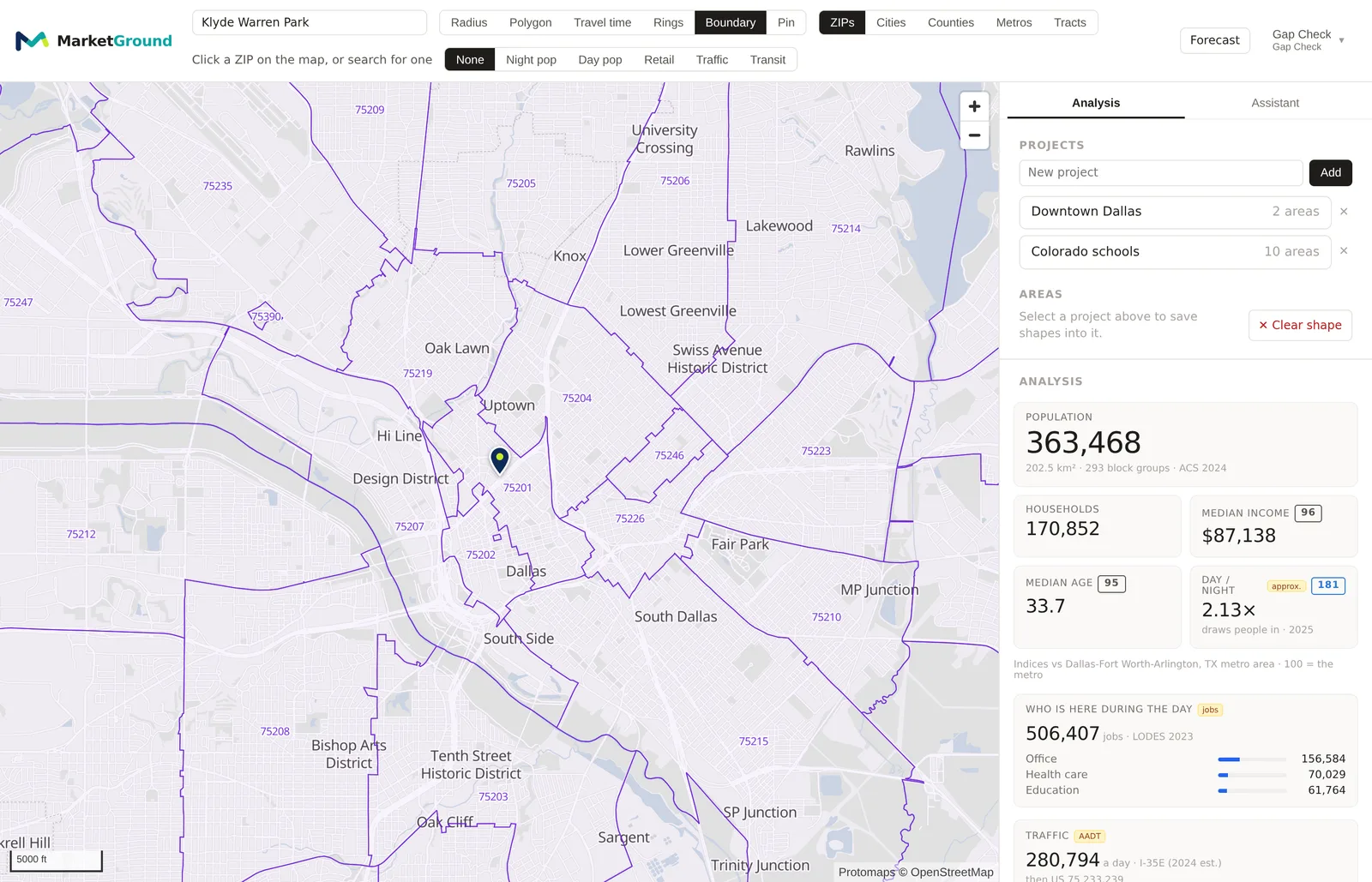
- Select Boundary in the toolbar. A row of buttons appears beside it, ZIPs, Cities, Counties, Metros and Tracts, and the search box changes to read, for example, Click a ZIP on the map, or search for one.
- Choose the kind. The map draws the outlines of every boundary of that kind in view.
- Click one of the outlines. It becomes the area and the panel fills with its figures. Or type a name or a ZIP code into the search box and choose the result, which does the same.
- To choose another, click another outline or search again.
The search box in Boundary mode
With Boundary selected, searching for a ZIP code, a city, a county or a metro by name picks it as the area at once. A result's badge says which kind it is. A search for a city with another kind selected switches the kind to match. Searching for a tract works by its number, such as "48113000100", because tracts have no names.
With Radius or another shape selected, choosing a city from the search list centers the map on it rather than making it the area, because a city is also somewhere to draw. To analyze the city itself, select Boundary first.
Reading the results
A boundary's figures are for the whole boundary. The note under the population figure gives its area in square kilometers and the number of block groups, which for a county can be several hundred. The Areas section describes a saved boundary by its kind and name, such as 75201 ZIP code or Dallas County county.
Because a boundary is made of whole block groups, its survey figures carry the margins the Bureau publishes rather than apportioned ones, and the methodology page explains why a tract drawn as a shape reads a wider margin than the same tract chosen as a boundary.
An example
Dallas County chosen as a boundary reads exactly the county's published 2020 census population, 2,613,539, which is one of the checks the product runs on itself. ZIP code area 75024 in Plano reads 45,469 and the city of Houston reads within a few hundred of its published 2020 figure, the difference being the Bureau's own boundary update since. A ZIP code chosen as a boundary and the same ZIP traced by hand as a polygon read close but not identical figures, because the hand tracing cuts block groups the boundary includes whole.
Things to know
A handful of boundaries are larger than an analysis can cover, such as a few enormous counties in the West and Alaska. The map says so if you click one, and suggests a smaller boundary.
City limits and ZIP code areas change. The product uses the Census Bureau's current boundaries for each, which lag real changes by a year or so.
A boundary can be edited into a drawn outline, which Editing a saved area explains, but once its corners are edited it is measured as a drawn shape rather than on the Bureau's blocks, and the editing box says so.
The boundaries drawn in view are the ones the map can see. Zoom out to see more counties, or zoom in to see tracts, which are drawn only from a closer zoom because there are so many.
Related pages
Radius and polygon areas and Travel time areas are the shapes you draw. The map describes the search box, the glossary defines the five kinds, and the methodology page explains how a boundary's figures differ from a drawn shape's.