What MarketGround measures and where the data comes from
What the product can tell you about any place in the United States, which government and public sources every figure comes from, and how a line drawn on a map turns into numbers.
What this is for
MarketGround answers one question in many forms. The question is "who is around this place?", and the place can be anything you can draw on a map, a circle around a corner, the ten minutes you can drive from a store, a ZIP code, or a site you already own. Once you have drawn the place, the product tells you how many people live there, how many are there during the day, what they earn, how old they are, what they do for work, which businesses are nearby, how much traffic passes, and how all of that compares with the city, the county, the metro and the nation.
It does this with public data. Nothing in the product comes from a private panel, a mobile phone feed or a guess. Every figure traces back to a government or public source that publishes its methods, and the methodology page says exactly how each one is used. This page is the short version, written so that you know what each number is before you rely on it.
Read this page first, then Your first analysis, which walks through drawing an area and reading the result.
The kinds of figures you will see
The figures fall into a few families, and each family comes from a different source and has its own strengths.
Residents. How many people live in an area, their households, ages, incomes, housing, education and origins. These come from the decennial census, which counts everyone every ten years, and from the American Community Survey, which asks a sample of households a longer set of questions every year. Because the survey is a sample, each of its figures carries a margin of error, which the product shows on paid plans.
People during the day. How many people are in an area while the working day is on, as against how many sleep there. A downtown office district may hold ten times as many people at noon as at midnight, and a residential suburb the reverse. The product builds this from where jobs are, where workers live and a modeled day and night surface, and shows the result as a day to night ratio. The glossary says more.
Jobs. How many jobs are located in an area, by industry, from the Census Bureau's LODES data, which reports jobs at the block level. This is a count of workplaces, not residents, so an area with many jobs and few residents is a place people come to for work.
Businesses. Every listed business inside and around an area, by category and brand, from Overture Maps, an open map data project backed by several large technology companies. The product takes a new snapshot every month, which is how it can say what opened recently and what is no longer listed.
Traffic and transit. The traffic counted on the roads around an area, hour by hour through the week, from state transportation departments by way of the Federal Highway Administration, and the transit stops and routes near it from each transit agency's published timetable.
Economy. A set of indexes that put an area's purchasing power, affordability, affluence, spending, social vulnerability, job mix, growth, credit access, designations and banking on one scale, with the nation at 100. These draw on the Bureau of Labor Statistics, the Bureau of Economic Analysis, the Treasury, the CDC, federal banking regulators and the IRS. Each index has its own help page in the Economy tab part.
The sources, one by one
This table lists every source the product reads and what it provides. The cadence column says how often the source itself is refreshed. The product is refreshed on a schedule that follows each source, so a figure can be a few months behind its source's latest release.
| Source | What it provides | How often it is updated |
|---|---|---|
| 2020 Decennial Census | The exact count of every person by block, the finest geography the Census Bureau publishes | Every ten years |
| American Community Survey, five-year | Income, housing, education, race and ethnicity, commuting, household types, with a margin of error on each figure | Every year |
| Census LODES | Jobs at every block by industry, and where the workers who hold them live | Every year |
| Census Population Estimates | County, city and township population totals for the current year, with births, deaths and migration by county | Every year, with revisions |
| LandScan USA | A modeled day and night population surface from Oak Ridge National Laboratory, for the years 2016 through 2021 | Archived at 2021 |
| Overture Maps | Businesses and points of interest, captured monthly since August 2026 | Every month |
| FHWA Highway Performance Monitoring System | Annual average daily traffic on counted roads, as reported by state departments of transportation | Every year |
| Transit agency timetables | Every published route and stop, for transit access and transit travel time areas | Weekly |
| OpenStreetMap | The road network behind driving, walking and cycling travel time areas | Continuous |
| BEA Regional Price Parities | Price levels for every metro and state, with the nation at 100 | Every year |
| BLS Consumer Expenditure Survey | What households at each income spend, by category, for the spending figures | Every year |
| CDC/ATSDR Social Vulnerability Index | The CDC's ranking of every census tract on sixteen measures | Every two years |
| FDIC and NCUA | Every bank office and credit union site, for banking access | Every year |
| FFIEC, CDFI Fund | Each census tract's Community Reinvestment Act income level, Opportunity Zone and New Markets Tax Credit status | With each release |
| Home Mortgage Disclosure Act | Every home purchase mortgage application lenders act on, by tract, for credit access | Every year |
| FHFA, BEA, IRS | Home price indexes, personal income and county to county migration, for growth | Every year |
The methodology page carries the same table with the exact data periods used in the product's published examples, and says for each source how the figures are processed.
How a line on a map becomes a number
This section explains how a figure for an arbitrary shape is produced, which is what determines what the figures mean.
The Census Bureau does not publish figures for circles or drive times. It publishes them for its own geographies, which nest inside one another. The smallest is the block, usually one city block, for which only the ten-yearly count is published. Blocks group into block groups of roughly 600 to 3,000 people, which is the smallest geography the American Community Survey reports for. Block groups group into tracts of about 4,000 people, tracts into counties, and so on.
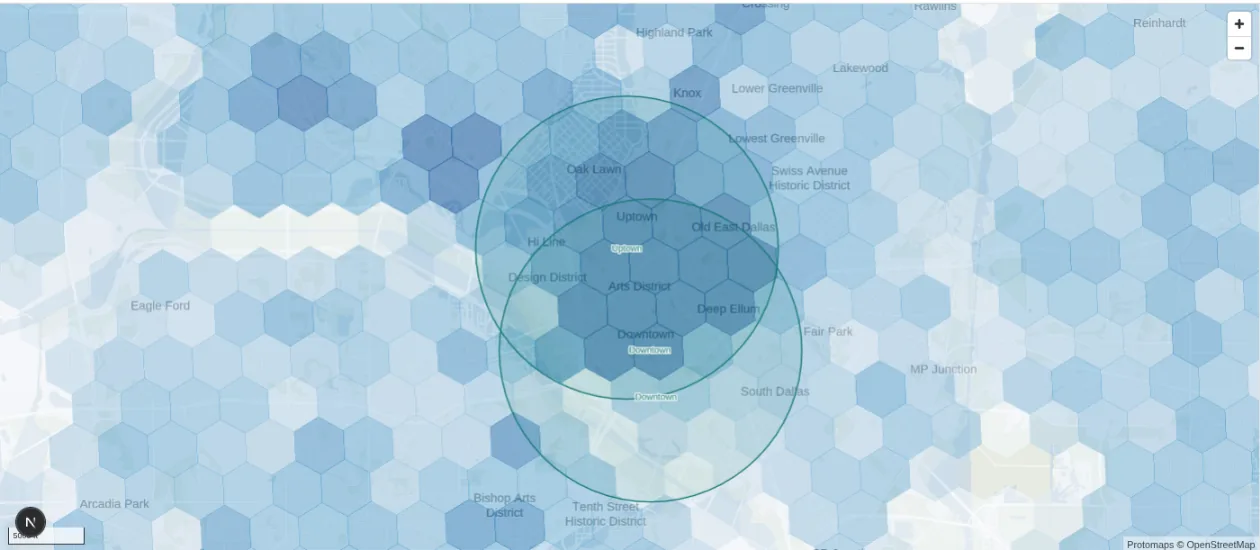
When you draw an area, MarketGround finds every block group your line touches. For each one it works out what share of that block group's people live inside your line, using the block counts to see where within the block group the people actually are, so that a block group that is half park and half apartments is not split in half by area alone. It then adds up those shares. A block group entirely inside your line counts in full, one that your line cuts through counts in part, and the result is a figure for your exact shape rather than for the nearest convenient boundary.
Every other survey figure is apportioned the same way, and the margin of error on each one is carried through the arithmetic, so that the margin on your area's total is a true margin and not a guess. Population history, daytime population and jobs are held on a fine hexagonal grid rather than on block groups, and the product reads the hexagons inside your line. The methodology page sets out the arithmetic and the checks behind it, including a test that a shape drawn exactly on a block group's boundary reproduces the published figures to the person.
Reading a figure
Four habits make the figures easier to use.
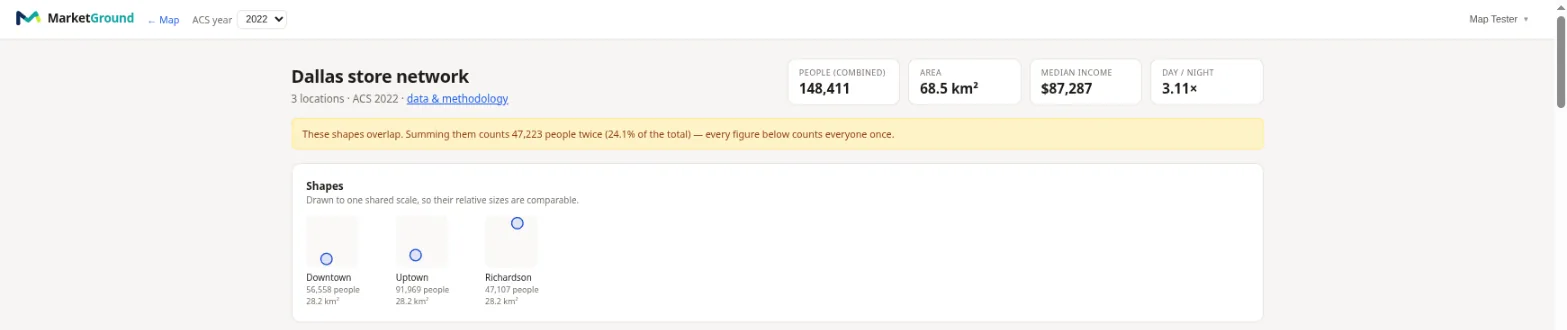
Notice the date. Each family of figures has its own year, shown beside it in the product. Resident figures from the survey cover a five-year window, so "ACS 2024" means answers collected from 2020 through 2024. Job figures lag by about two years, because the Census Bureau publishes them that way. Business figures are the latest monthly capture. A page in the product that mixes families will show more than one year, and that is expected.
Read the margin. On a paid plan a survey figure shows a range, such as "2,340, plus or minus 210". That range is where the true figure almost certainly sits. A small area has wider margins than a large one, because fewer households were surveyed there, and a figure whose margin is as large as the figure itself is telling you not to lean on it.
Compare before you judge. A median income of $91,000 means little on its own and a great deal once you can see the metro's $78,000 beside it. On paid plans the product shows a comparison for every figure, and an index with the metro at 100 that lets you read the comparison at a glance.
Remember what the figure is for. Resident counts tell you who sleeps there. Daytime population tells you who is there at noon. Jobs tell you where people work. Businesses tell you what is already serving the area. A coffee shop on a commuter route cares about daytime population and traffic. A grocery store cares about residents and households. The analysis page is organized by these questions so that you can go to the one you have.
Things to know
The product measures the United States only, and some sources do not cover every place. Traffic counts exist only where a state counts a road, so a quiet street shows no count. Transit access exists only where an agency publishes a timetable in the open format the product reads, which most large agencies do and some small ones do not. Business listings depend on what the map sources have captured, which is complete for most commercial streets and thinner in rural areas.
Figures describe residents and workers, not shoppers. Nothing in the product tracks individual people or phones. The spending figures on the Economy tab are what households at an area's incomes would spend at national habits, not a record of what anyone spent.
The product never shows a figure for a place too small to have one. A survey figure for an area with very few households is withheld rather than shown as a misleading number, and the page says why.
Related pages
Your first analysis walks through drawing an area and reading the panel. The map, the search box and the layers describes the map itself. The glossary defines the terms used here, and the methodology page is the full account of every source and calculation.