The Businesses tab
The businesses and places inside the area, counted by type and by brand, the leading categories and brands, what has been newly listed and what is no longer listed, and where the competition and co-tenancy tools sit.
What this is for
The Businesses tab answers "What businesses are here, and how is that changing?". The people figures say who could shop in an area. This tab says who is already serving them, which is what tells a business whether a market is crowded, underserved or turning over. It counts every open business and place listed inside the project's areas, groups them by type and by brand, and, because the product takes a new snapshot of its sources every month, says what has appeared and what has stopped being listed.
Every place counts once however big it is, so these are counts of storefronts, not of floor space or sales. A corner store and a department store are each one place.
Where to find it
Choose Businesses in the row of tabs. The counts and the leading categories and brands are included in every plan. The business change section is part of the Pro and Team plans, as are the competition and co-tenancy tools, which have pages of their own under Competition and finding new sites. The row of links under the question jumps to each section.
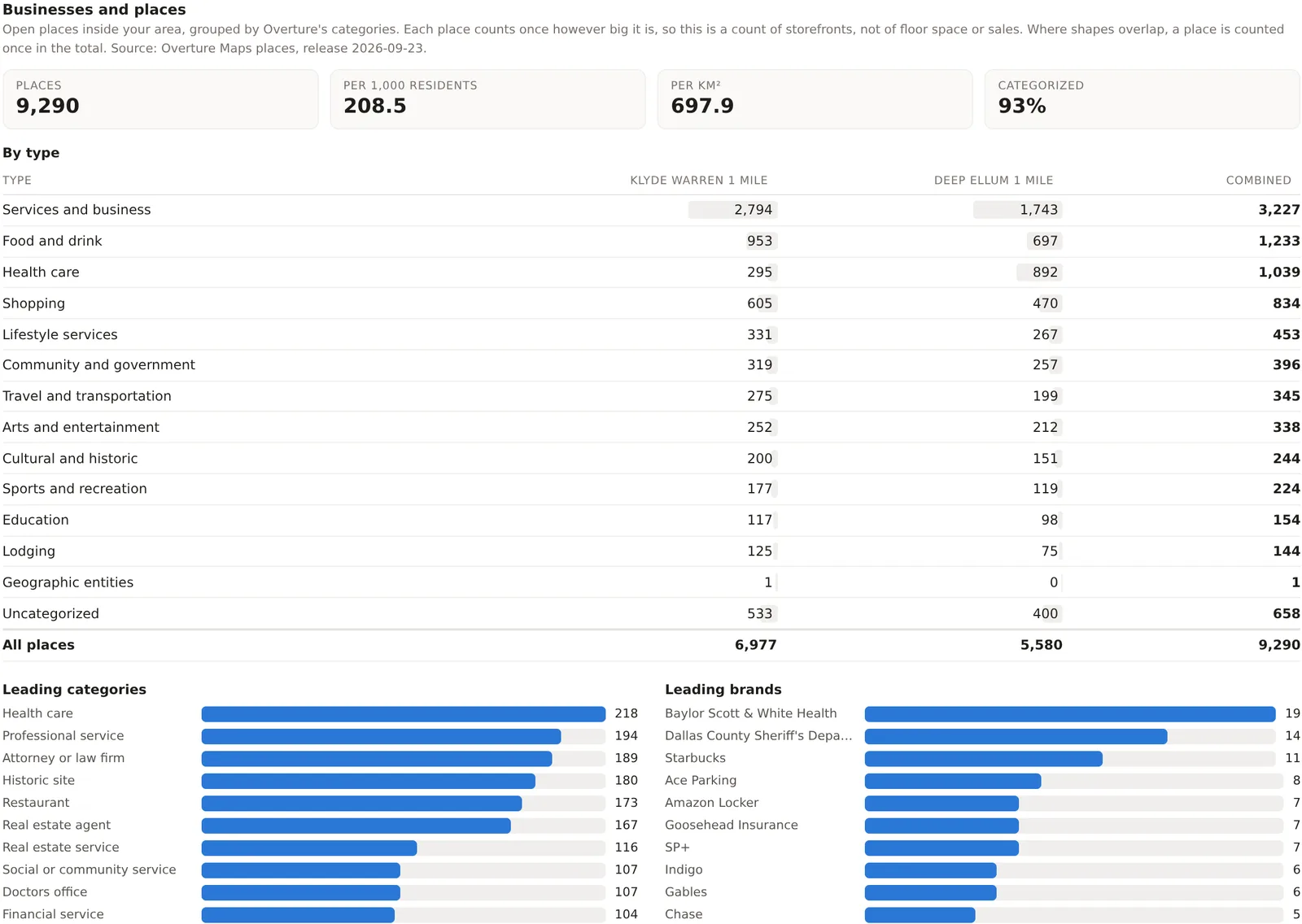
Businesses and places
Four figures and a table. Places, every open business and place inside the combined footprint, counted once where areas overlap. Per 1,000 residents and Per km², the same count against the people and the area, which is how two areas of different size are compared. Categorized, the share of places whose type is known, since a listing without a category still counts as a place but not in any row of the table.
The table gives the places by type, in the source's top level categories, namely services and business, food and drink, health care, shopping, lifestyle services, community and government, travel and transportation, arts and entertainment, cultural and historic, sports and recreation, education, lodging, and uncategorized, with a column for each location and a combined column. Beneath it, Leading categories lists the ten finest categories with the most places, such as restaurants, real estate agents or doctors' offices, and Leading brands lists the ten chains with the most places. The source and its release date are named under the title.
Competition and co-tenancy
Two tools sit between the counts and the change section. Competition takes the kind of business you compete with, counts them in and around your locations, compares the residents per competitor with the metro, and estimates how nearby residents split among the stores by travel time. Co-tenancy says how well the businesses around each location match the neighbors a chosen brand usually has, or what a vacancy near each location would suit. Each has a page of its own, Competition and market share and Co-tenancy profiles. Both are part of the Pro and Team plans.
Newly listed and no longer listed
The product captures its business sources every month, and this section reads the captures as a history. A place counts as newly listed when it appears in a capture for the first time, and as no longer listed when it is missing from two monthly captures in a row, dated to the first. A missing listing does not by itself say the place closed, moved or merged, so a closing date is shown only when a source confirms one, and places that come back under a new identifier are not counted.
The window buttons choose 3 months, 6 months or 12 months, and the figures are Newly listed, No longer listed and Net, each as a count and per 100 open places, with the same rates for the metro beside them. Net change by type gives every type of place open now, the places newly listed and no longer listed in the window, the net change and its share of the places of that type, and a chip comparing the type's rate of change with the same type across the metro, where 100 means the same. Beneath the table, the leading categories and brands that were newly listed or dropped, and lists of the recently listed and no longer listed places by name.
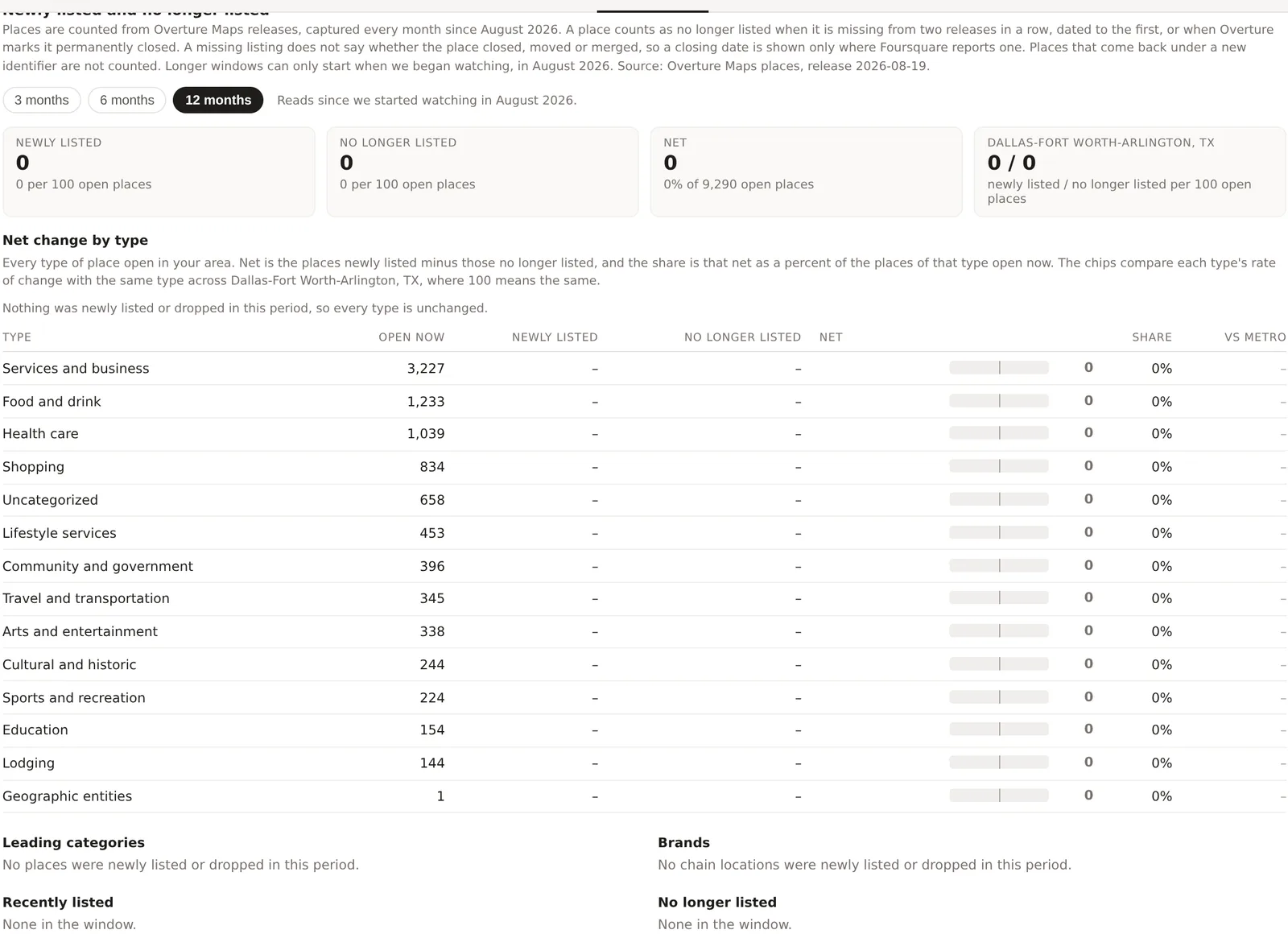
The history began in August 2026, so longer windows are possible only as the captures accumulate, and the card says since when it has been watching. Part of the Pro and Team plans.
An example
The Downtown Dallas project on 30 October 2026 held 9,290 places, 208.5 per 1,000 residents and 697.9 per square kilometer, 93 percent of them categorized. Services and business led with 3,227, then food and drink with 1,233, health care with 1,039 and shopping with 834. The leading fine categories were health care, professional service, attorney or law firm, historic site and restaurant, and the leading brands a hospital group, the county sheriff's department, Starbucks with 11 places, and a parking operator. Food and drink places per 1,000 residents, 1,233 against 44,549 people, is about 28, many times a residential suburb's figure, because downtown restaurants serve the 220,000 people who work there rather than the 44,000 who live there, which is the comparison the Work & Movement tab makes possible.
Things to know
The counts are of listings. A business with two listings, say a pharmacy inside a grocery store, can count twice, and a business the sources have not captured counts not at all. Coverage is complete for most commercial streets and thinner in rural areas.
The categories are the source's, and a business can be listed under a category you would not choose. The Retail layer on the map lets you hover a dot to see what the source calls it.
A count per 1,000 residents in a downtown is large because the residents are few. Read it beside the daytime population on the Work & Movement tab.
The change figures read the captures, and the first capture was August 2026, so nothing that happened before then is visible.
Related pages
The Work & Movement tab comes before this one and The Compare tab after. The map describes the Retail layer. Competition and market share, Co-tenancy profiles and Coverage gaps build on these counts, and the methodology page explains the change rules.