Help › Competition and finding new sites
Competition and market share
For a chosen kind of business, the competitors inside an area and around it, residents per competitor against the metro, an estimate of how nearby residents split among the stores by travel time, and how much a project's own locations draw on the same people.
What this is for
The people figures say how many customers an area holds. The competition section says how many businesses already compete for them. For a kind of business you name, it counts the competitors inside each of a project's areas and within a ring around them, compares the residents per competitor with the same figure across the metro, and estimates what share of the nearby residents each store, yours and theirs, is likely to win on position alone. The cannibalization section on the Compare tab reads the same estimate across your own locations.
The estimate is a measure of position, not performance. Every store is treated as equally attractive, because the data holds no floor area, sales or footfall, and the share is of nearby residents by travel time alone. It is never revenue, footfall or a forecast, and the assumptions print beside the number.
Where to find it
The Competition card on the Businesses tab of the analysis page, with Cannibalization on the Compare tab. A competitor line under a saved area's figures on the map and a competition control at a drawn shape's pin use the same model. Part of the Pro and Team plans.
Step by step
- In the box reading Coffee shops, grocery stores, Starbucks…, type the kind of business you compete with. The list offers a category with everything under it, categories that are filed apart but usually compete, such as coffee shop or cafe, and brands matched exactly as listed, with how many are nearby.
- Choose one. The settings appear beneath it.
- Set Ring around the shape, the distance around each area within which competitors are counted, 3 kilometers by default. Set Distance decay, which says how strongly residents prefer a nearer store, with 2 as the usual choice. Set Demand to residents, or to the daytime population estimate for a business that serves workers and visitors.
- Leave Model competitors beside this project's locations on to include the competitors in the share estimate, and Count this project's competitor pins on to count the pins you have dropped as competitors.
- Press Count and model. The counts and the shares appear after a moment, and the choice is kept with the project.

The settings, one at a time
The kind of business is a category from the places taxonomy with everything under it, or a brand matched exactly as listed. Some markets are filed in two branches of the taxonomy, and the list offers those pairs as one choice, coffee shop or cafe being the common case.
Ring around the shape counts competitors just outside an area as well as inside it, because a store across the street from the boundary competes as much as one inside. The default of 3 kilometers is about a ten minute drive in a city.
Distance decay is the power to which travel time is raised in the share estimate. At 2, a store twice as far away is a quarter as attractive. The result is shown beside the same estimate at 1.5 and 2.5 so that the range is visible.
Demand chooses whose share is estimated, residents or the daytime population.
Competitor pins. The pins you have dropped as competitors count inside the area and within the ring like listed places, and each replaces the listing it was made from or a listing of the same business within 75 meters, so that a store is never counted twice. The result says how many competitors are pins.
Reading the results
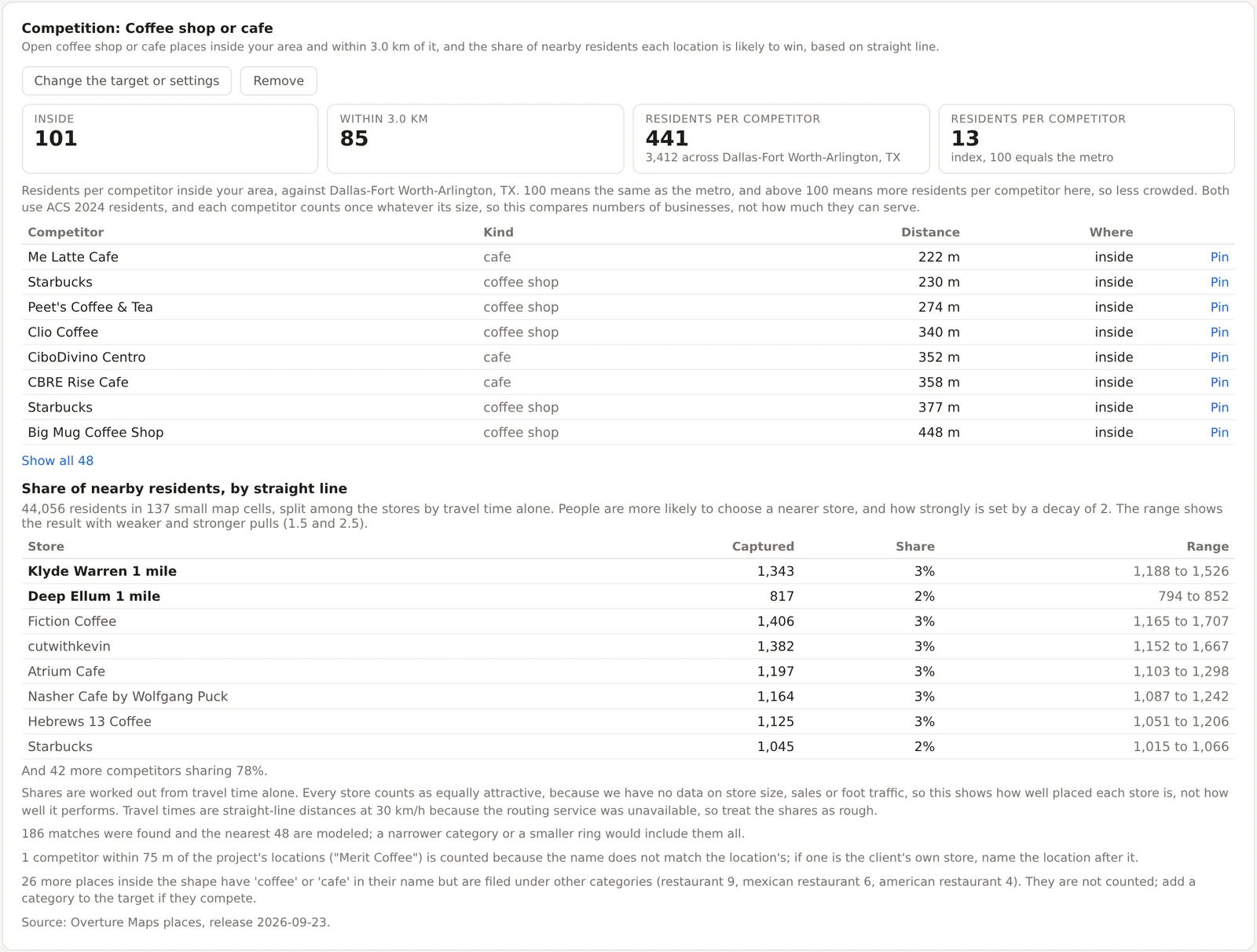
Inside and Within the ring are the counts. Residents per competitor is the area's residents divided by the competitors inside it, beside the same figure across the metro, and the index beneath sets the two against each other with the metro at 100, so that above 100 means more residents per competitor here, which is less crowded. The list beneath names each competitor with its kind, its distance from the area and whether it is inside, with a Pin button to drop a pin on it and keep notes.
Share of nearby residents is the estimate. Each small cell of the area's population grid gives its residents to the stores in proportion to travel time raised to the negative decay, which is a Huff gravity model, and the table lists each store with the residents it captures, its share and the range between the weaker and stronger pulls. Travel times come from the product's own routing on the road network, and when that is unavailable the model falls back to straight-line distance at 30 kilometers per hour and says so.
Cannibalization
On the Compare tab, the Cannibalization card reads the same model across your own locations. Each row gives what a location captures and how much of that another of your locations also draws on, and the pairs that overlap most are named with the residents both claim. The figures are smaller than the plain overlap of the trade areas on the map, because a resident inside two trade areas mostly goes to the nearer store rather than half to each, and the card says so. It needs a competitor kind chosen on the Businesses tab first.
An example
The Downtown Dallas project on 30 October 2026, for coffee shops and cafes with a 3 kilometer ring and a decay of 2, counted 101 competitors inside its two circles and 85 more within the ring, 441 residents per competitor against 3,412 across the Dallas-Fort Worth-Arlington metro, an index of 13. The share table split 44,056 residents in 137 cells among 49 stores, with the Klyde Warren location capturing 1,343, a 3 percent share with a range of 1,188 to 1,526, and the Deep Ellum location 817, a 2 percent share. The cannibalization card said the two claim 367 of the same residents, far fewer than the 10,944 who live in both circles, for the reason the card gives. The index of 13 is the finding. A downtown has one coffee shop for every 441 residents where the metro has one for every 3,412, and the share any single store can expect is a few percent, which is the figure to set beside the daytime population of 270,000 before deciding that the market is saturated.
Things to know
The counts are of listings, as on the Businesses tab, and each competitor counts once whatever its size.
The share is by travel time alone and treats every store as equally attractive. A store that is larger, better or cheaper than its neighbors will do better than its share says, and the model cannot see that.
The routing service draws the travel times. When it is unavailable the card says the shares are by straight line and rough.
Related pages
Co-tenancy profiles asks a different question about the neighbors, namely whether they are the ones a brand usually has. The Businesses tab counts every business. Pins and notes describes the competitor pins. The methodology page gives the model.