Decision history
A record on a project of which site was chosen, against which criteria and why, frozen as things stood at the time, with an outcome added later, and the organization's list of every decision in settings.
What this is for
A project moves on after a decision. Sites are added and removed, the sheet is edited, the data is refreshed, and a year later nobody can say what was on the table when the choice was made or why. Decision history records that. It freezes the candidates and how many lines of the criteria sheet each passed, the sheet's lines and version, and the stress test's sentences, with the reason in the decider's own words, and keeps them with the project whatever changes afterwards. What happened later, a lease signed, a store opened, a loss in negotiation, is added as a separate, later entry on the same record.
For a consultant it is the file note that answers a client's question months on. For an organization it is the list of every decision it has made, searchable in one place.
Where to find it
The card headed Decision at the foot of the Overview tab, with Record a decision. Every decision in the organization is listed in Settings under Decisions. Decision history is part of the Pro and Team plans.
Step by step
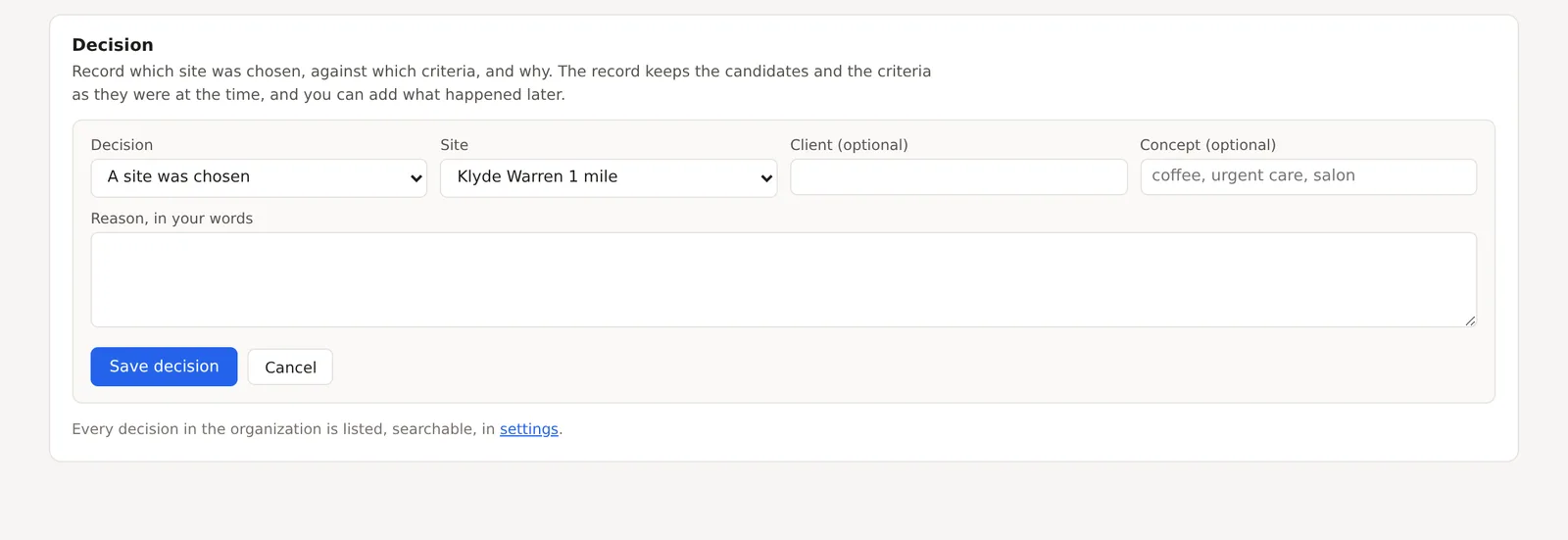
- On the Overview, press Record a decision. The form opens on the card.
- Choose the decision, A site was chosen, No site was chosen or The decision was deferred. For a chosen site, pick it from the project's locations.
- Fill in the client and the concept if you want them, such as "coffee" or "urgent care", which the settings list searches by, and the reason, in your words.
- Press Save decision. The record keeps the project's candidates with their screener results, the criteria sheet as it stands, and the stress test's sentences.
- Later, open the card again to add an outcome, one of Lease signed, Opened, Lost in negotiation, Withdrawn or Other, with a note. The outcome is kept apart from the decision as a later fact.
Reading a record
A saved decision shows on the Overview with the site, the date, the reason and the outcome if one has been added, and the PDF report prints it in a section of its own with the frozen candidates and criteria. The card says Outcome, a later fact before the outcome, because the two are different things. Nothing scores a decision by its outcome. A rejected site may have failed a lease despite an attractive market, and a signed lease says nothing about the analysis that preceded it.
The decisions list in settings
Settings holds a list of every decision in the organization, with the project, the site, the client, the concept, the criteria, the outcome and the date, and a search box over client, concept, site, project and reason. A consultant with forty projects finds every urgent care decision in one search.
A switch on that card, Let outcomes be counted, lets the organization's outcomes be counted into aggregate figures by outcome kind and concept, as counts only and never as sites, clients or reasons. It is off until the organization turns it on.
An example
A project comparing the two Dallas circles for a coffee concept would record that the Klyde Warren circle was chosen, with the concept "coffee" and a reason such as "stronger daytime population and the competitor count was read as demand rather than saturation", and the record would freeze both candidates at four of five lines passed on the coffee template and the stress test's sentence that Klyde Warren led in all four scenarios. If the lease were signed in December, the outcome would be added then, and the report would show both, with the date of each.
Things to know
A decision is a record, not a lock. The project can still change, and that is the point, because the record keeps what the project no longer shows.
One decision can be recorded per project, and it can be edited. The outcome can be added or changed at any time.
Outcomes are never counted unless the organization's switch is on, and then only as counts by kind and concept.
Related pages
The site criteria screener and The stress test produce the results a decision freezes. The Overview tab holds the card, and the methodology page says what is kept and what is never done with it.