Help › Forecasts, sharing and the assistant
The assistant
A conversation about an area or a project that answers from the same data as the map, what it can look up, what it can propose for you to save, the confirmation before anything is written, and its allowances.
What this is for
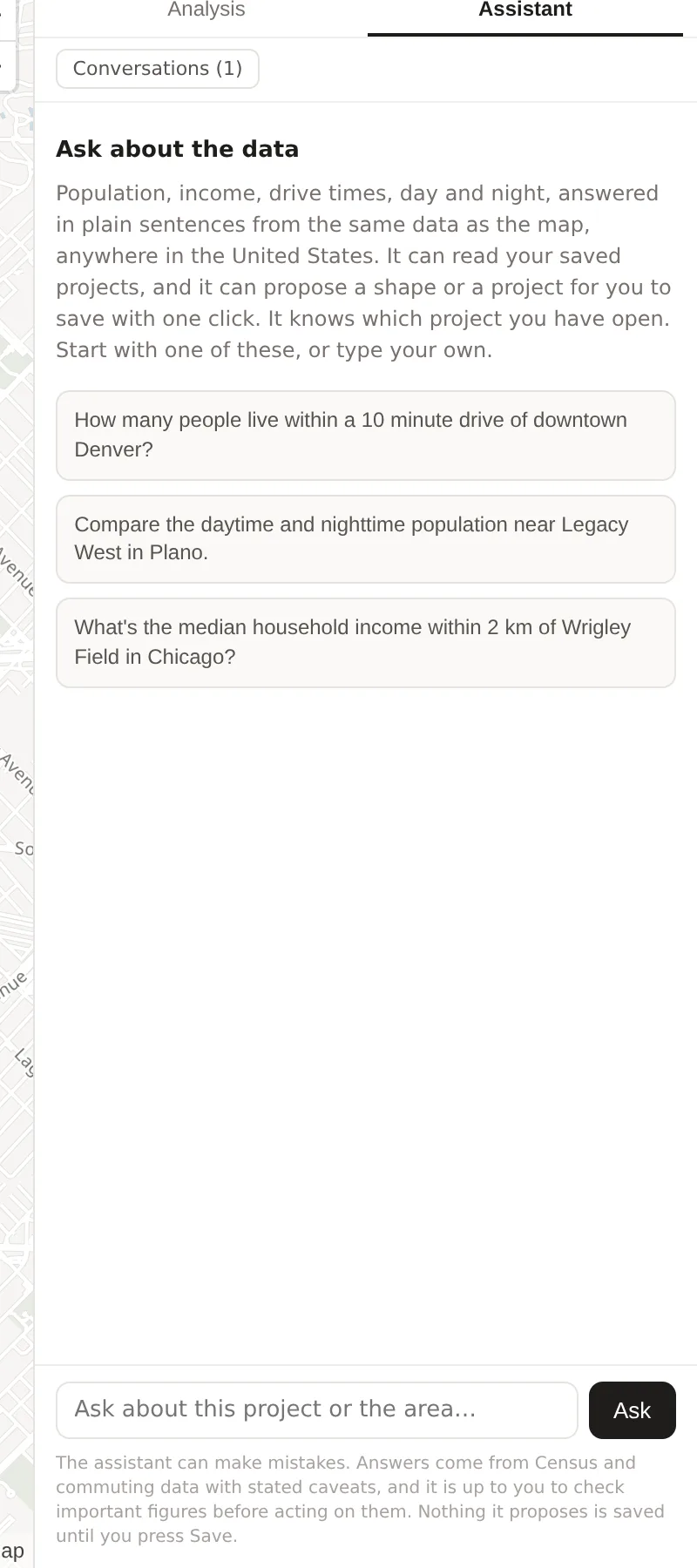
The assistant answers questions about places in plain sentences, from the same data the map and the analysis page show. "How many people live within a ten minute drive of downtown Denver?" is answered with the figure, its year and its caveats, and "Compare the daytime and nighttime population near Legacy West in Plano" with both figures and what they say. It can read your saved projects, it knows which project you have open and where the map is, and it can propose a shape, a pin or a project for you to save with one press.
It proposes and you decide. Nothing it suggests is written until you press Save, and the panel says so beneath every conversation.
Where to find it
The Assistant tab at the top of the side panel on the map, and Assistant in the top bar of the analysis page, which opens the panel for that project. The assistant is included in every plan, with allowances of messages a day and a month and of tokens a month that the Plan & usage card in settings shows.
Step by step
- Open the Assistant tab. It opens on a new conversation with three example questions, or on Conversations, the list of your earlier ones.
- Type a question in the box reading Ask about this project or the area and press Ask, or choose an example.
- While it works, the panel shows each lookup as a status line, such as analyzing a radius or finding a place, so that a question needing several lookups reads as progress.
- Read the answer. A figure comes with its year and caveat, and a proposal comes as a card with a Save button.
- Ask the next question. The conversation is kept on the server under its title, visible to you and nobody else, and survives a reload.
What it can look up
The assistant has a fixed set of lookups, each running the same code as the product's own pages for your organization alone. It can find a place by name, analyze a radius, a named boundary, a drive time or a transit time, read the population trend and the daytime figures, find retailers and count a brand's locations, read the traffic on a road and the busiest times of a place, summarize the businesses in an area and what has changed, list your projects and compare a project's locations, read a project's screener grid, stress test, decisions and pins, estimate market share and co-tenancy, find the tenants that fit a vacancy, and run a coverage gap search. It cannot look at anything outside your organization's projects and the public data, and it cannot change anything.
What it can propose
Three things, each as a card. A location, a shape to save into the open project, drawn from a question such as "save a fifteen minute walk from the Nasher as Arts District walk". A pin, a marker with a note. A project, a new folder to hold what follows. The card shows what would be saved, and Save runs the same request the panel's own form would. Until then nothing exists.
It can also draft the narrative that opens a project's report, from the project's own figures, which The PDF report describes. Every number in a draft is checked against the figures before it is shown, and a sentence with a number that does not match is removed.
Reading an answer
An answer gives the figure with its source and year, such as the survey year for residents or the LODES year for jobs, and the caveat the product's own page would show, such as a daytime figure being an estimate. A question about a place the data does not cover, such as transit where no timetable is loaded, is answered with that rather than with a guess. The line beneath every conversation says that the assistant can make mistakes and that important figures should be checked before acting on them, which is the right reading of any answer.
An example
Asked "How many people live within one mile of Klyde Warren Park in Dallas, and what is their median income?", the assistant finds the park, analyzes a one mile radius around it and answers with the population and the median household income for that circle from the survey year, which are the same figures the panel shows for the same circle on the map. Asked to save it as "Klyde Warren 1 mile" in the open project, it proposes the location as a card, and pressing Save adds it to the Areas section exactly as drawing and saving would.
Things to know
The assistant reads the data through fixed lookups scoped to your organization, so a name in a place listing cannot make it do anything the lookups do not allow.
A conversation is yours. Other members of the organization do not see it.
The allowances are by message and by token, and the daily message allowance is the one most often met. The Plan & usage card shows both.
Related pages
The PDF report describes the narrative the assistant can draft. The side panel holds the Assistant tab. Plans, limits and usage shows the allowances, and the methodology page explains how a draft's numbers are checked.