Billing
Subscribing to a plan, changing the plan or the billing interval, the card on file and invoices through the billing portal, how Team seats are billed, and closing an account.
What this is for
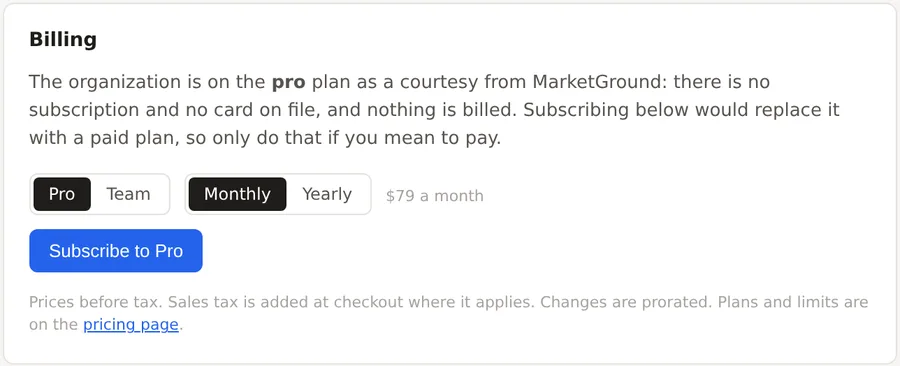
The Billing card in settings is where an organization's owner starts a subscription, changes it, keeps the card and the invoices, and ends it. Everyone else in the organization sees the facts and none of the buttons, because only an owner can change what the organization pays.
Where to find it
Settings, the Plan & billing tab, the Billing card, with Cancel or close beneath it. The pricing page's Upgrade to Pro and Set up a Team buttons lead to the same card with that plan preselected.
Subscribing
- On the Billing card, choose Pro or Team, and Monthly or Yearly. The price is shown for the choice, before tax.
- Press Subscribe to Pro or Subscribe to Team. The browser goes to a hosted checkout page run by the payment provider, where the card is entered. The product never sees the card.
- After checkout the browser returns to settings, which shows the new plan within a few seconds.
Pro is $79 a month or $790 a year, and Team is $59 per seat a month or $590 per seat a year, with five seats the minimum. Yearly billing is ten months for twelve. Sales tax is added at checkout where it applies.
Changing the plan or the interval
With a subscription in place, the card offers the other plan and the other interval. A change takes effect at once and is prorated, so that moving from monthly to yearly or from Pro to Team charges or credits the difference for the rest of the period.
The card, invoices and cancellation
With a subscription in place, Manage card and the other manage buttons open the payment provider's portal, where the card on file can be changed, every invoice can be downloaded, and the subscription can be canceled. A canceled subscription runs to the end of the period paid for and the organization then returns to the free plan with its projects intact, within the free plan's limits.
Team seats
On a Team plan every member of the organization is a seat, and every membership change moves the seat count on the next invoice, which the Members card says above its invite form. Team members and invitations explains roles and invitations.
Closing an account
The Cancel or close section says how to end a subscription and how to close the account. Closing deletes the organization's projects and shapes permanently, and it is done by a person on request, by email from the address on the account, so that nobody loses years of saved work to a misclick.
Things to know
Only an owner sees the Billing card's buttons. A member or an admin sees the plan and the status.
An organization on a courtesy plan, given without a subscription, sees that on the card, and subscribing would replace the courtesy with a paid plan.
Changes are prorated and prices are before tax, as the card says beneath its buttons.
Related pages
Plans, limits and usage says what each plan includes. Team members and invitations covers seats and roles.